

Managed rules and paranoia levels
Shield uses paranoia levels based on the OWASP Core Rule Set (CRS) to control how aggressively its managed WAF rules inspect traffic. The dashboard provides four presets:
CRS levels are cumulative: each level includes the rules from the levels below it. For example, Level 2 includes both PL1 and PL2 rules.
Higher levels can detect more attacks, but they can also flag legitimate requests. Test representative application traffic and review false positives when increasing your level.
Custom configuration
Select Custom to configure these settings independently:- Detection paranoia level
- Blocking paranoia level
- Execution paranoia level
How Shield blocks requests
A single matching rule within the configured blocking paranoia level is sufficient to block a request. Shield does not use CRS-style cumulative anomaly scoring for this blocking decision. There is no anomaly-score threshold that a request must reach before it is blocked. For more information about the underlying levels, see the OWASP CRS paranoia-level documentation. Its discussion of anomaly scoring describes CRS behavior and does not apply to Shield’s blocking decision.Custom rule fundamentals
Every custom WAF rule is built from four parts: a variable that tells the engine where to look in a request, an operator that defines the match condition, optional transformations that normalize the data before comparison, and a response action for matches. Each playing a vital role in the request evaluation process:- Variable: This section specifies the parts of the HTTP request that the Rule Engine should examine. By defining a Variable, you instruct the WAF on where to look within the request, such as headers, URIs, or parameters.
- Operator: Operator defines the condition or logic that triggers a match against the specified Variable (and Variable Value). It determines how the extracted data is compared to a given value, using operations like equality, pattern matching, or range checking.
- Transformations: Before evaluation, the extracted data can be normalized or transformed for consistent matching, such as converting it to lowercase or stripping whitespace.
- Response Action: Upon a successful match, Response Action specifies what the WAF should do with the request. Actions can include blocking the request, logging it for analysis, or issuing a challenge to the client.
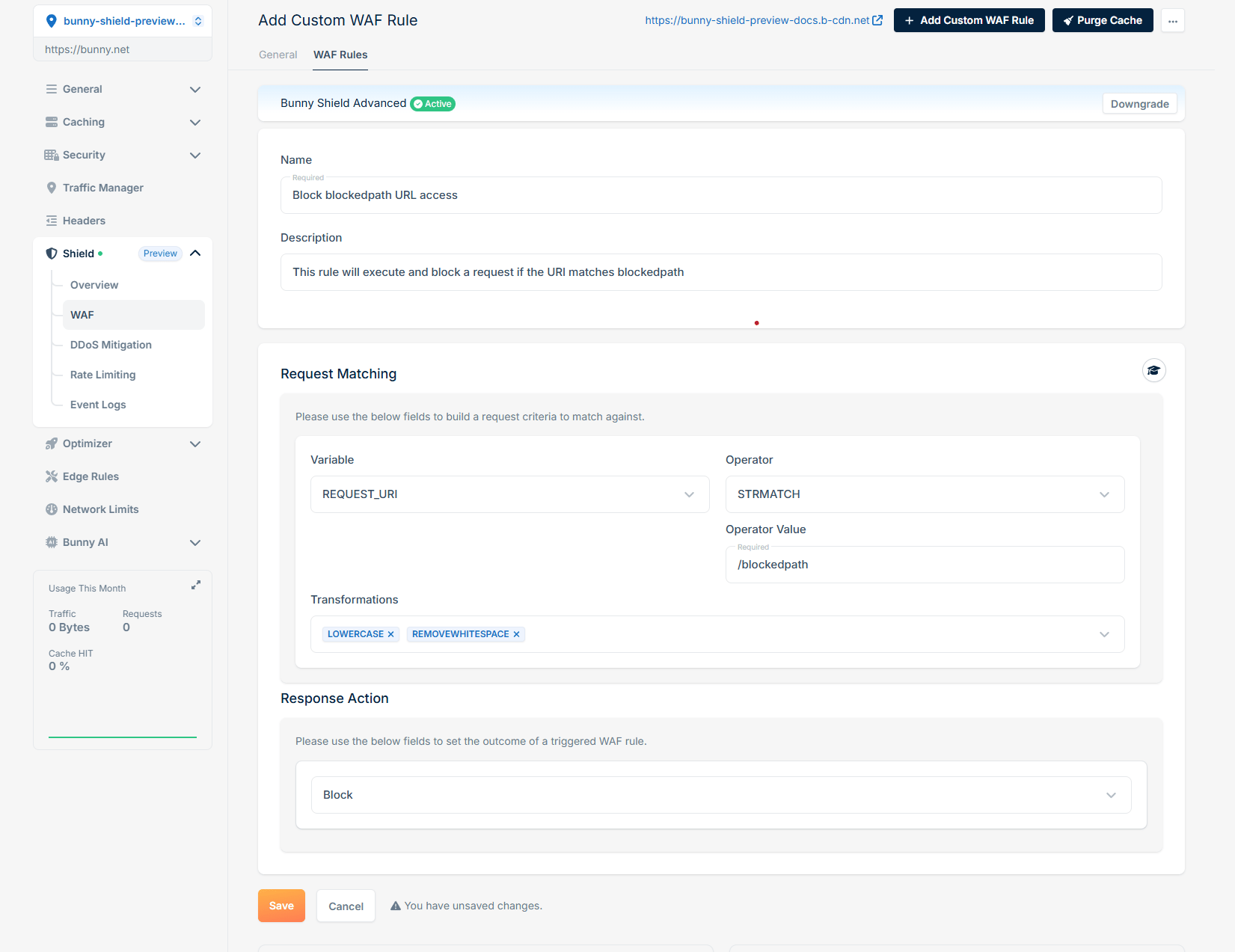
Variables
Variable define where in the HTTP request the WAF should extract data for evaluation. Each Variable corresponds to a specific element of the request.REQUEST_URIThe full URI of the incoming request (e.g., /path/to/resource?query=123).REQUEST_URI_RAWThe raw, unprocessed URI, possibly including encoded values (e.g., %2F instead of /).ARGS(Optional Variable Value) All request parameters (both GET and POST).ARGS_COMBINED_SIZEThe combined size (in bytes) of all request arguments.ARGS_GET(Optional Variable Value) All query parameters passed via the GET method.ARGS_GET_NAMES(Optional Variable Value) The names (keys) of query parameters in the GET method.ARGS_POST(Optional Variable Value) All request parameters passed via the POST method.ARGS_POST_NAMES(Optional Variable Value) The names (keys) of parameters in the POST method.FILES_NAMESThe names of uploaded files in the request.GEO(Optional Variable Value - COUNTRY_CODE, LATITUDE, LONGITUDE, ASN, CITY, CONTINENT, ORGANIZATION) (Advanced) The geo location information of the client making the request. With no Variable Value, returns all components.REMOTE_ADDRThe IP address of the client making the request.QUERY_STRINGThe raw query string of the request (e.g., ?key=value&name=example).REQUEST_BASENAMEThe base name of the requested file (e.g., index.html).REQUEST_FILENAMEThe full path of the requested file (e.g., /var/www/index.html).REQUEST_LINEThe complete HTTP request line (e.g., GET /index.html HTTP/1.1).REQUEST_METHODThe HTTP method used in the request (e.g., GET, POST, PUT).REQUEST_PROTOCOLThe HTTP protocol version (e.g., HTTP/1.1, HTTP/2).REQUEST_COOKIES_NAMES(Optional Variable Value) The names of cookies sent in the request.REQUEST_COOKIES(Optional Variable Value) All cookie key-value pairs sent with the request.REQUEST_HEADERS_NAMES(Optional Variable Value) The names of headers included in the request.REQUEST_HEADERS(Optional Variable Value) All request headers in a key-value pair format.REQUEST_BODY(Advanced) The textual payload of the request body.RESPONSE_HEADERS(Optional Variable Value) All response headers sent back to the client.RESPONSE_BODY(Advanced) The textual payload of the response body returned by the origin server.RESPONSE_STATUSThe HTTP status code returned in the response (e.g., 200 OK, 404 Not Found).FINGERPRINT(Optional Variable Value - JA4_A, JA4_B, JA4_C and any two-letter combination such as JA4_AB) (Advanced) The TLS client fingerprint of the request. With no Variable Value, returns the full JA4 string.VERIFIED_BOT_CATEGORYThe category assigned by verified-bot detection, e.g.SEOfor verified search-engine crawlers, or empty when the client is not a recognized verified bot.
Operator
Operator determines the condition under which a match is triggered. It defines how the WAF compares the extracted and transformed data against the specified value.BEGINSWITHCheck if a string starts with a specified substring.ENDSWITHCheck if a string ends with a specified substring.CONTAINSCheck if a string contains a specified substring.CONTAINSWORDCheck if a string contains a specific whole word (whitespace-delimited).WITHINCheck if the variable value appears as a substring within the operator value (the inverse ofCONTAINS).STRMATCHSubstring match against the operator value. Functionally equivalent toCONTAINS.STREQCheck if a string has exact match, case insensitive.EQEquality check: whether two integers are exactly equal.GECheck if an integer/double is Greater than or equal to.GTCheck if an integer/double is Greater than.LECheck if an integer/double is Less than or equal to.LTCheck if an integer/double is Less than.RXRegular expression match.DETECTSQLI(Advanced) Detect SQL injection attempts in input.DETECTXSS(Advanced) Detect cross-site scripting (XSS) attempts in input.
Transformations
Transformations are applied to the extracted data before evaluation to normalize or modify it, ensuring consistent comparisons.CMDLINEPreprocess input as if it were a command-line string (e.g., handling escape sequences or arguments).COMPRESSWHITESPACEReplace multiple whitespace characters (spaces, tabs, newlines) with a single space.CSSDECODEDecode CSS-encoded input (e.g.,%2Fin CSS or\00002Fencoding).HEXENCODEEncode the input as hexadecimal (e.g.,abc→616263).HTMLENTITYDECODEDecode HTML entities (e.g.,<→<,A→A).JSDECODEDecode JavaScript-encoded strings, such as escape sequences in JS (e.g.,\x41→A).LENGTHReturn the length of the input string.LOWERCASEConvert input to lowercase (e.g.,Hello→hello).MD5Hash the input using the MD5 hashing algorithm.NORMALIZEPATH/NORMALISEPATHNormalize file paths by removing redundant parts (e.g.,/a/../b→/b).NORMALIZEPATHWIN/NORMALISEPATHWINNormalize file paths specific to Windows-style paths (e.g.,C:\\folder\\..\\file→C:\file).REMOVECOMMENTSRemove comments from input, such as<!-- -->in HTML or/* */in CSS/JS.REMOVENULLSRemove null bytes (\x00) from the input.REMOVEWHITESPACERemove all whitespace from the input (e.g.,a b c→abc).REPLACECOMMENTSReplace comments in the input with a placeholder or empty string.SHA1Hash the input using the SHA-1 hashing algorithm.URLDECODEDecode standard URL-encoded input (e.g.,%2F→/).URLDECODEUNIDecode URL-encoded input with Unicode normalization (handles double-encoded payloads).UTF8TOUNICODEConvert UTF-8 encoded input to Unicode.
Response Actions
Response Actions specifies the action the WAF takes when a rule condition is met.BlockBlock the request.LogLog the request.Challenge(Advanced) Challenge the request with JS PoW.